
Redirect customers to WhatsApp after an order
You can send customers to WhatsApp right after they place an order. This lets you confirm the order directly with them.
Where to find it
Section titled “Where to find it”Go to Form Builder → Thank You Page.
How to redirect customers to WhatsApp
Section titled “How to redirect customers to WhatsApp”Step 1: Under Action after completing an order, select Redirect to WhatsApp for direct customer communication.
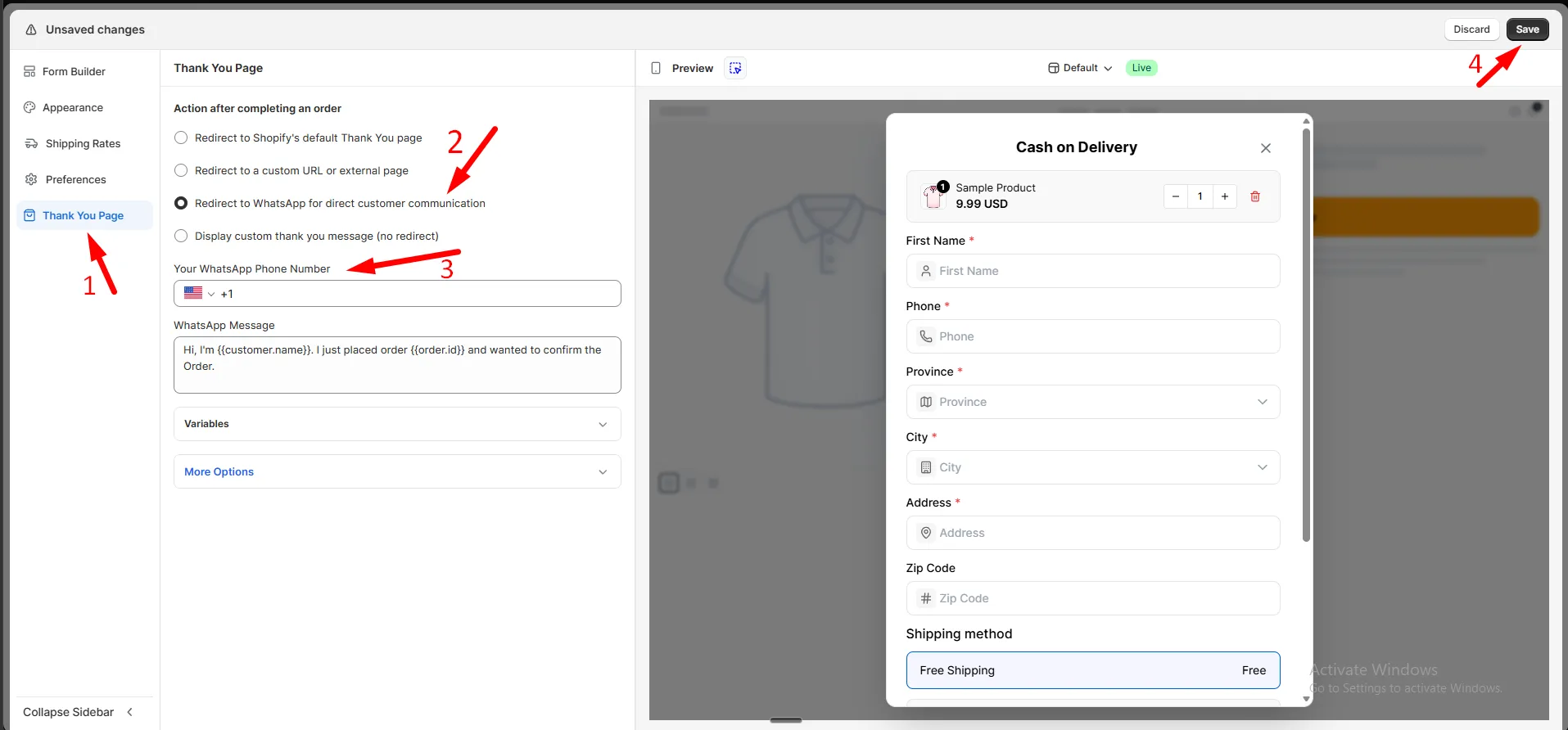
Step 2: Enter Your WhatsApp Phone Number with the country code.
Step 3: Enter a WhatsApp Message. This is pre-filled when WhatsApp opens.
You can use variables like {{customer.name}} and {{order.id}} to personalize it.
Step 4: Click Save.
More options
Section titled “More options”Expand More Options to set:
| Option | What it does |
|---|---|
| Redirecting message | Text shown for 3 seconds before the customer is sent to WhatsApp |
| Custom thank you page | A confirmation page customers see briefly before WhatsApp opens, and land back on if they return from WhatsApp |