
Send shipping confirmation messages
A shipping confirmation message is sent to the customer automatically when their order is fulfilled.
How to enable shipping confirmation messages
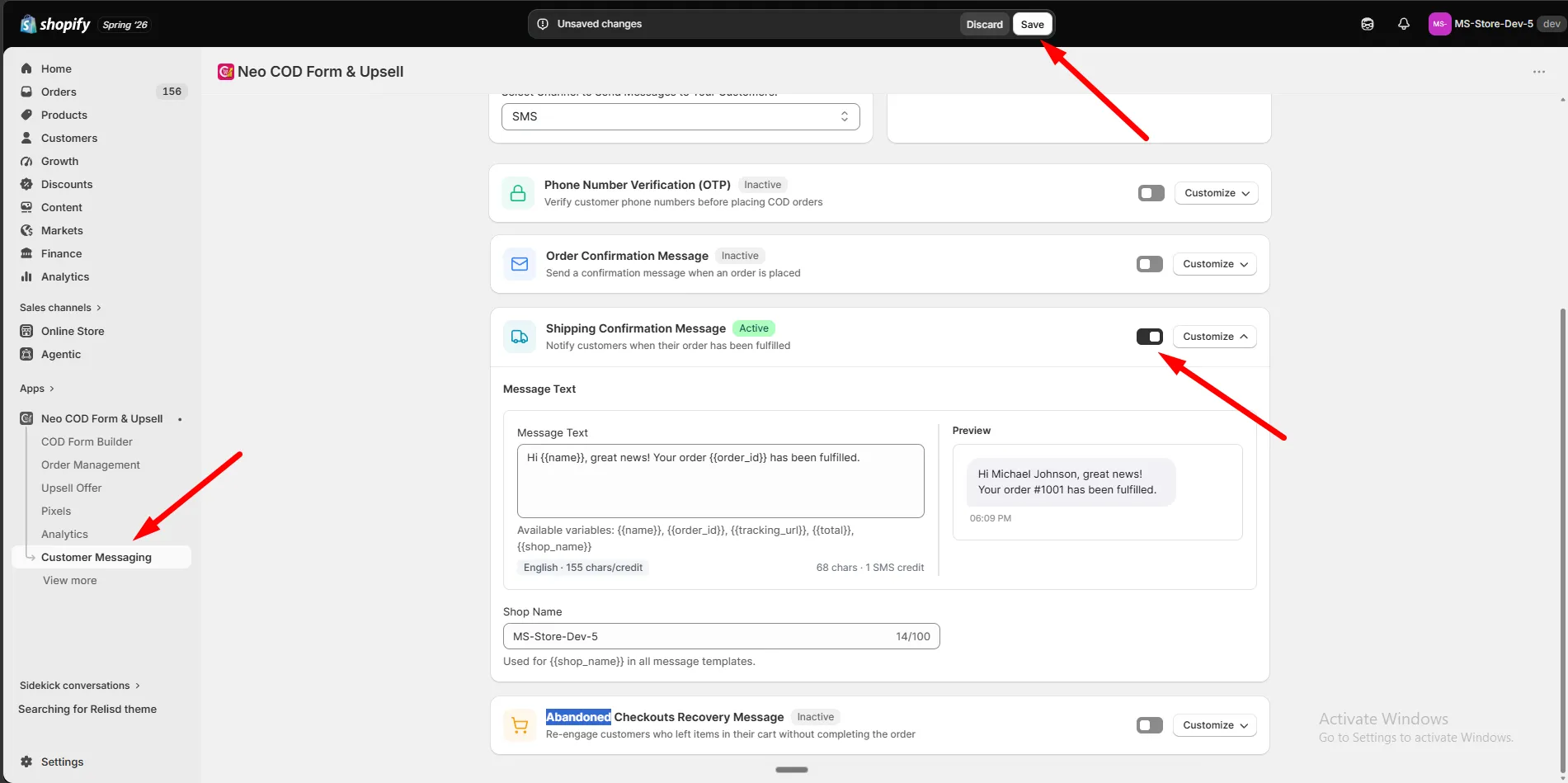
Section titled “How to enable shipping confirmation messages”Step 1: Go to Customer Messaging.
Step 2: Set the Messaging Channel (SMS or WhatsApp) in the channel card.
Step 3: Make sure your Balance has enough funds — top up if needed.
Step 4: Find Shipping Confirmation Message and turn on the switch.
Step 5: Click Customize.
Message
Section titled “Message”Step 1: Write the message under Message Text.
Step 2: Use these variables:
| Variable | Inserts |
|---|---|
{{name}} |
Customer name |
{{order_id}} |
Order number |
{{tracking_url}} |
Tracking link |
{{total}} |
Order total |
{{shop_name}} |
Your store name |
Step 3: Check the Preview.
Click Save. The message now sends automatically whenever an order is fulfilled.