COD Order Form or Shopify Checkout: Which One Brings You More Orders?
COD order forms vs Shopify Checkout: See how a dedicated Cash on Delivery form can simplify ordering and reduce friction.
If you run a Shopify store where most customers pay Cash on Delivery, you may have noticed something frustrating.
A customer clicks your product, decides to buy, and then has to move through a checkout experience that was not specifically designed around COD ordering.
For prepaid customers, Shopify Checkout works extremely well.
But for a COD customer who simply wants to enter their name, phone number, delivery address, and place an order, every additional step can create another opportunity to leave.
So the real question is:
Should your COD customers use the standard Shopify Checkout, or should you use a dedicated COD order form?
Let’s compare both.
Shopify Checkout vs a COD Order Form
Before choosing one, it’s important to understand that neither option is universally better.
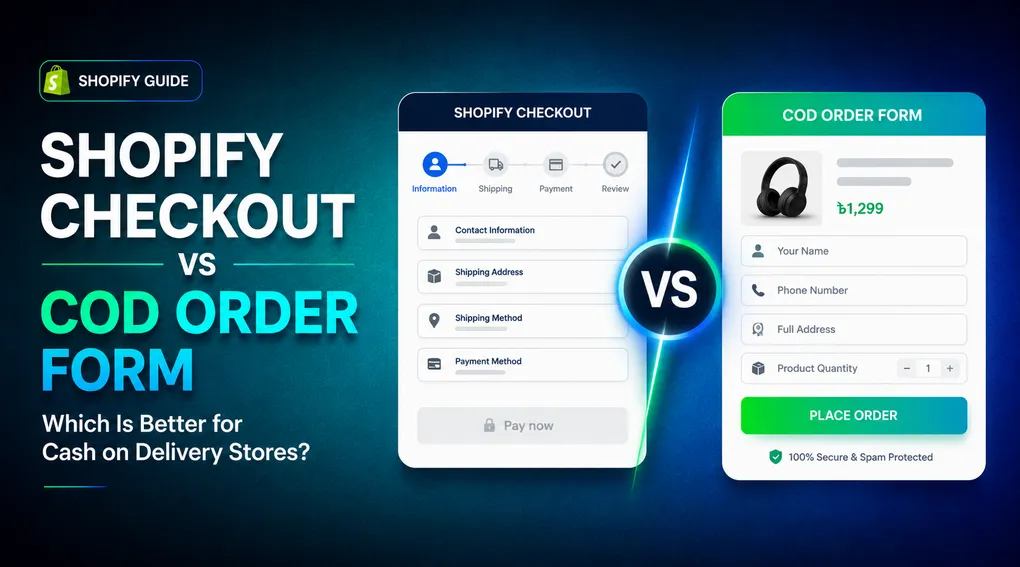
Shopify Checkout is a complete checkout system designed to support different payment methods, shipping options, discounts, customer information, and other ecommerce requirements.
A dedicated COD form takes a different approach.
Instead of sending a customer through a traditional checkout flow, it puts the important COD fields directly on the product page or in a dedicated ordering form.
That makes the experience more focused on one thing:
Place the order and pay when it arrives.
Why COD Customers Behave Differently
A COD customer does not necessarily need the same experience as a prepaid customer.
Imagine a customer sees your product through a Facebook or TikTok ad.
They click the ad.
They land on your product page.
They want the product.
They don’t want to create an account, search through payment methods, or enter card information.
They simply want to provide:
- Name
- Phone number
- Delivery address
- Location
- Quantity
Then they want to place the order.
This is particularly relevant in markets where COD is a common payment method, including Bangladesh, India, Pakistan, Egypt, Morocco, Nigeria, and other COD-heavy markets.
The goal is not to make Shopify Checkout worse.
The goal is to create an ordering experience that matches how your customers actually pay.
What Happens With Standard Shopify Checkout?
With the standard checkout experience, customers typically move through several stages before completing an order.
Depending on the store configuration, they may need to provide contact information, shipping details, select a shipping option, and then choose a payment method.
For a customer who intends to pay cash on delivery, some of those steps may feel unnecessary.
And checkout complexity matters.
Baymard’s latest checkout research reports a global average cart abandonment rate of around 70%, while 17% of US online shoppers in its research reported abandoning an order because the checkout was too long or complicated. Baymard also found that an ideal checkout flow can be reduced to as few as 12 form elements.
That does not mean every abandoned cart is caused by checkout design.
Customers abandon carts for many reasons, including price comparison, shipping costs, lack of purchase intent, and simply browsing.
But it does show why reducing unnecessary friction is worth testing.
Where Shopify Checkout Still Makes Sense
Shopify Checkout has major advantages.
It is especially useful when your customers:
- Pay by card
- Use wallets or other online payment methods
- Use discount codes
- Purchase multiple products
- Need a traditional checkout experience
- Prefer Shopify’s standard payment flow
Shopify also provides checkout customization through Checkout Extensibility. However, Shopify’s documentation notes that checkout UI extensions for the information, shipping, and payment steps are available only to Shopify Plus stores.
So this isn’t a case of replacing Shopify Checkout for every store.
For many merchants, the better approach is to use the right ordering experience for the right customer.
What Is a COD Order Form?
A COD order form puts the ordering process directly in front of the customer.
Instead of:
Product → Cart → Checkout → Shipping → Payment → Order
the experience can become:
Product → COD Form → Order
The customer sees the fields needed to place a COD order and submits the order without going through the traditional payment flow.
For a simple COD product, the form might only require:
Name → Phone → Address → Order
That’s the main advantage.
The experience is designed around COD from the beginning.
Why a One-Page COD Form Can Be Useful
A dedicated COD form can help merchants reduce unnecessary steps in the ordering process.
Instead of asking a customer to navigate a general-purpose checkout, you can build a form specifically for your COD workflow.
You can decide:
- Which fields customers see
- Which fields are required
- Where the form appears
- How the order button looks
- Which shipping information is collected
- Whether customers can add an upsell
- Whether phone verification is required
This is especially useful for stores running paid traffic to individual products or landing pages.
Neo COD Form & Upsell: Built for the Complete COD Journey
This is exactly the problem Neo COD Form & Upsell is designed to solve.
Instead of giving merchants only a basic order form, Neo combines the COD ordering experience with customization, fraud controls, upsells, tracking, and other tools needed to manage COD orders.
1. Build a COD Form Around Your Store
Create a custom Cash on Delivery form with a drag-and-drop editor.
You can choose the fields your customers actually need and customize the form to match your store.
Need a simple form?
Use only the essentials.
Need more information?
Add additional fields for things such as:
- Address
- Province
- City
- Landmark
- Alternate phone
- Delivery notes
- Quantity
- Other custom information
With 25+ field options, you can build the form around your actual fulfillment process instead of forcing every store into the same layout.
2. Make the Order Button Clear
Your customers should immediately understand what happens when they click the button.
For a COD store, a clear action such as:
Order Now (Pay on Delivery)
can communicate the payment method without making the customer think about what happens next.
You can also provide a separate Pay Online option when you want to serve customers who prefer prepaid orders.
That means you don’t necessarily have to choose between COD and online payments.
You can support both.
3. Reduce Fake Orders With Verification and Blocking
A COD form should not only make ordering easier.
It should also help you protect your orders.
Neo provides tools for controlling suspicious or unwanted orders, including:
- Phone number validation
- OTP verification
- IP-based blocking
- Postal-code validation
- Quantity limits
- Other order validation rules
OTP verification can add an important layer of confirmation before an order moves forward.
The goal is simple:
Keep the ordering process fast without leaving the door open to every low-quality order.
4. Add Upsells Without Making Customers Start Over
COD stores often have another challenge.
The customer places an order for one product, but there may be an opportunity to sell a related product or additional quantity.
Neo lets you create:
- One-click upsells
- Quantity offers
- Pre-purchase offers
- Downsells
- Post-purchase offers
For example:
Buy 1 → $20
Buy 2 → $35
Or:
Add the matching accessory to your order with one click.
The customer doesn’t have to restart the entire ordering process.
5. Track Your Advertising Events
If you run Facebook, Google, TikTok, Pinterest, Snapchat, X, or GA4 campaigns, tracking matters.
Neo supports tracking integrations for multiple advertising and analytics platforms so merchants can measure the activity around their COD ordering flow.
That is especially important for merchants who rely heavily on paid traffic.
Instead of treating the COD form as just a form builder, you can use it as part of your broader advertising and conversion workflow.
Shopify Checkout vs Neo COD Form
| Feature | Shopify Checkout | Neo COD Form |
|---|---|---|
| Traditional checkout | ✅ | — |
| Dedicated COD ordering flow | Limited | ✅ |
| One-page COD form | — | ✅ |
| Custom form fields | Limited by checkout capabilities/plan | ✅ |
| Drag-and-drop COD form builder | — | ✅ |
| OTP verification | — | ✅ |
| Phone/IP/order blocking | — | ✅ |
| Quantity offers | Available through apps/custom setup | ✅ |
| One-click upsells | Available through apps/custom setup | ✅ |
| Downsells | Available through apps/custom setup | ✅ |
| Multi-platform pixel tracking | Through Shopify/app ecosystem | ✅ |
| Custom COD experience | Limited | ✅ |
| Best suited for COD-focused stores | Not specifically | ✅ |
| Best suited for prepaid checkout | ✅ | Can coexist |
The important point is not that Shopify Checkout is bad.
It’s that Neo is built specifically around the COD workflow
Which One Should You Use?
Use Shopify Checkout when:
- Most customers pay online
- Your store has a mixed payment audience
- Customers regularly use cards or wallets
- You need the standard Shopify checkout experience
- Your products require a more traditional checkout process
Use a COD form when:
- COD is your primary payment method
- Most customers come from mobile ads
- You sell through product-focused landing pages
- You want customers to order quickly
- You need custom COD fields
- You want built-in order verification and fraud controls
- You want COD-specific upsells and offers
Use both when:
Your store serves both COD and prepaid customers.
This is often the most practical setup.
Let customers who want to pay online use the standard online payment experience, while giving COD customers a dedicated ordering flow.
Final Thoughts
Shopify Checkout is a powerful general-purpose checkout.
But if your business is heavily dependent on Cash on Delivery, your customers may benefit from an ordering experience designed specifically around COD.
A dedicated COD form can reduce unnecessary steps, collect the information you actually need, and give you more control over verification, order quality, upsells, and tracking.
And you don’t have to choose between a fast COD experience and the rest of your Shopify payment setup.
Use the right experience for the right customer.
If COD is an important part of your business, Neo COD Form & Upsell gives you the tools to build that experience in one place.
Ready to test a dedicated COD ordering experience?
Install Neo COD Form & Upsell, build your Cash on Delivery form, customize it for your store, and test the complete customer journey before sending your next batch of paid traffic.
Start with the free plan and see how your COD workflow performs.