COD Form vs Shopify Checkout: Which One Actually Converts Better for Indian Stores?
COD form or Shopify checkout for your India store? See why the default checkout leaks COD orders and how a one page form fixes conversion, RTO and tracking.
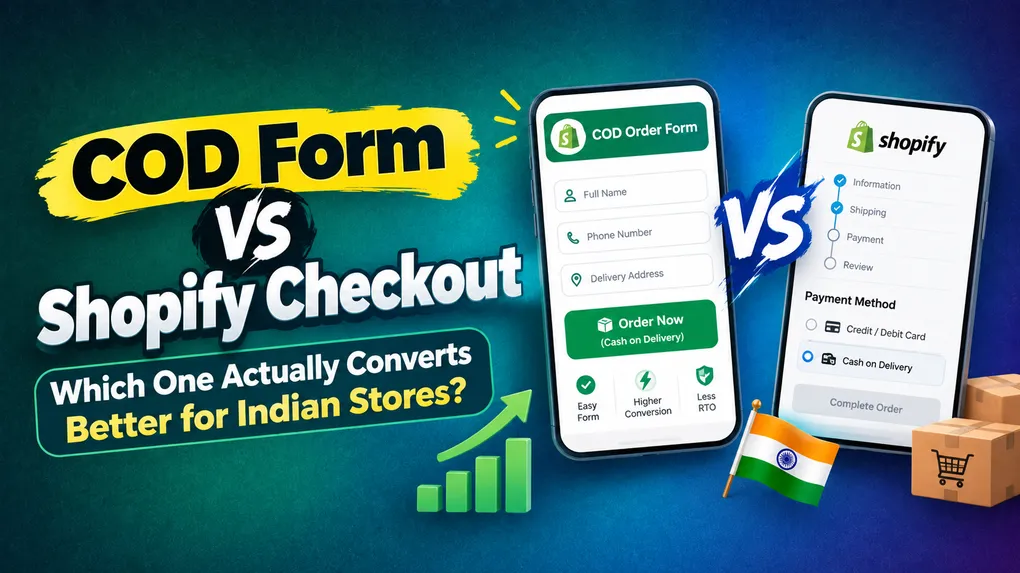
Every Indian Shopify merchant runs into the same wall eventually.
You spend money on Meta ads. Traffic lands on the product page. People click “Buy Now.” And then something like 70 to 80 percent of them vanish somewhere between the cart and the thank you page. You check your analytics, you see the drop, and you have no clue what happened in between.
Then a competitor in your niche shows you their store. No cart page. No shipping step. No payment step. Just a form sitting right under the product image asking for name, phone number and address, with a big button that says “Order Now (Cash on Delivery).” Their conversion rate is double yours on similar traffic.
So what is actually going on? Why does the default Shopify checkout, which is used by millions of stores worldwide, quietly bleed orders in India?
The answer is simple once you see it. Shopify’s checkout was designed for a card driven, prepaid first, email based Western buyer. Indian COD commerce is a completely different animal. Let us go through exactly where that mismatch costs you money, and what a dedicated COD form does instead.
First, a reality check on COD in India
COD is not what it was in 2019, but it is nowhere near dead either.
Different reports throw different numbers around. Some payment industry reports put COD as low as 18 to 25 percent of Indian ecommerce orders today, because UPI has taken over urban checkout behaviour. Others, especially reports focused on D2C brands and Tier 2 and Tier 3 markets, still put COD anywhere between 40 and 60 percent of order volume.
Both are true, and the gap tells you something important.
In metro cities, prepaid now accounts for the majority of transactions. UPI is everywhere and paying online is faster than digging out cash. But outside the metros, and especially for first time buyers who found your brand through a Meta ad they had never seen before, COD is still the payment method that makes the purchase feel safe.
If your customer base sits in Lucknow, Indore, Patna, Coimbatore and Nagpur rather than only South Delhi and Bandra, COD is carrying a big part of your revenue. And that means the way you collect COD orders is not a small operational detail. It is one of the highest leverage things in your entire funnel.
The flip side is well known. COD RTO rates in India commonly run in the 25 to 30 percent range for unmanaged stores. Industry analysis has found COD rejections account for roughly 26 percent of RTOs in India, against under 2 percent for prepaid orders. COD orders also carry noticeably higher fulfilment costs once you count failed delivery attempts and reverse logistics.
So the real question is: how do I capture the maximum number of COD orders while keeping the fake and flaky ones out?
The default checkout does neither of those two jobs well.
Where the default Shopify checkout breaks down for Indian stores
It is a multi step flow on a mobile screen
Around 85 percent of Indian ecommerce traffic is mobile. The standard path is product page, then cart, then contact information, then shipping method, then payment, then confirm. Every one of those transitions is a place where a distracted person on a patchy 4G connection simply leaves.
This is not clever psychology, it is arithmetic. If every step in a five step flow loses 20 percent of people, you finish with about 33 percent of the ones who started. That is your funnel leak, and no amount of ad optimisation fixes it because the problem is downstream of the ad.
It asks for email before phone
Shopify’s checkout leads with email in most setups. A very large number of Indian COD buyers do not use email as their primary identity. Some do not check it for weeks. They will either abandon at that first field or type something fake to get past it.
The damage does not stop at the drop off. It also destroys your recovery. Abandoned cart emails in India get opened 15 to 25 percent of the time. An SMS lands on the lock screen of a phone that is already in the buyer’s hand, and it gets read within minutes. If your checkout captured a fake email and no phone number, you have nothing to follow up with.
COD is hidden until the very last screen
This is the big one. The buyer has to get through four steps before they even find out that yes, they can pay cash on delivery. Indian shoppers want that reassurance up front, at the moment they are deciding, not after they have already typed out their full address.
Conversion research on Indian stores keeps finding the same thing: making COD visible and prominent early is one of the fastest wins available, and burying it inside checkout leaves a serious chunk of potential orders on the table.
You cannot customise it without Shopify Plus or a developer
This is where most Indian merchants get stuck. Since Checkout Extensibility replaced checkout.liquid, hiding, renaming or reordering payment methods runs through the Payment Customization API, and the deeper drag and drop rule building through Checkout Blocks is a Shopify Plus feature.
Want to add OTP verification on the phone number? That is a Checkout UI Extension, which means the Shopify CLI, some React and a developer. Want a landmark field because your courier keeps failing deliveries in a specific colony? Same story. Want to block a pincode with a 60 percent return history? Same story again.
Merchants on Basic or Grow plans are effectively locked out of the exact controls that COD selling requires.
Your pixel data is probably broken right now
Since the deprecation of checkout.liquid, merchants who had custom tracking scripts injected into checkout have had to rebuild everything as Web Pixel extensions. A lot of stores are quietly running with Purchase events that fire partially, fire late, or do not fire at all.
That starves the Meta algorithm of the one signal it needs to find more buyers like your buyers. Bad conversion data makes every campaign you run more expensive, and most merchants never realise it is happening because the orders still show up in Shopify admin.
There is no place to increase order value before purchase
Pre purchase upsells and order bumps inside native checkout are, again, largely a Plus feature. So on the exact screen where your buyer is warmest and most committed, you have no way to offer them a second unit, a bundle or an add on. You are leaving AOV on the floor at the highest intent moment in the entire journey.
What a COD order form does instead
A COD form replaces that whole multi step journey with one screen on the product page.
The buyer sees the product, scrolls a little, and there is the form. Name. Phone. Address. Maybe a pincode field. One button. Order placed. No redirect, no cart page, no payment step, no login prompt.
That is the entire pitch, and it changes the numbers immediately.
Fewer steps means fewer exits. Collapse a five step flow into one and the arithmetic above stops working against you. Merchants who move COD traffic from native checkout to a one page form commonly report conversion lifts in the 20 to 40 percent range, and single page order forms have become the standard pattern in every COD heavy market for exactly this reason.
Phone number becomes the primary identity. That matches how Indian buyers actually think, and it hands you a working mobile number you can use for SMS confirmation and recovery. Your abandoned order economics change completely.
COD is visible immediately. The trust signal arrives at the moment of hesitation, not four screens later.
You control every single field. Add a landmark field. Remove the company name field nobody fills. Add an alternate phone number on high value orders. All of it without a developer and without Plus.
Ad tracking becomes reliable again. The form fires its own events, so you can send clean Purchase, InitiateCheckout and AddToCart signals to Meta, GA4, Google Ads, TikTok, Snapchat, Pinterest and X without depending on checkout scripts that may or may not have survived migration.
Upsells happen where the buyer is warmest. A one tick “add a second one for 30 percent off” offer inside the form converts far better than a post purchase email three days later.
Fraud controls run before the order is created. OTP verification, IP blocking and pincode rules filter the junk out at the door instead of leaving you to cancel orders manually every night.
Side by side comparison
| Factor | Shopify Native Checkout | Dedicated COD Form |
|---|---|---|
| Steps to complete order | 4 to 5 screens | 1 screen |
| Mobile experience | Multi step, built for desktop logic | Built for one thumb |
| Primary identifier | Email first | Phone first |
| COD visibility | Buried at the final step | Immediately visible |
| Custom fields (landmark, alt phone) | Needs Checkout UI Extensions | Drag and drop |
| Pincode and IP blocking | Requires apps or Functions | Built in |
| Pixel accuracy | Depends on Web Pixel rebuild | Direct event firing |
| Abandoned order recovery | Email, if the email was real | SMS to a verified phone number |
| Setup effort for COD selling | Developer or Plus plan | Install and configure |
| Best suited for | Prepaid, subscriptions, card markets | COD heavy, ad driven, Tier 2 and 3 India |
Keep prepaid in the mix, on your terms
None of this means you should stop pushing prepaid. Prepaid orders are cheaper to fulfil and barely return. You just should not force every buyer through a checkout built for prepaid in order to get there.
The setup that works is this. Put the COD form on your product pages for cold, ad driven traffic. Offer a prepaid discount of 5 to 10 percent right inside the form. The buyers who want to pay by UPI take the discount and go through Shopify checkout. Everyone else places a COD order in one screen instead of bouncing at step three.
You capture the COD buyer who would have been lost, and you still convert as many people to prepaid as you would have anyway. The form decides who goes where, instead of the checkout deciding for you by making everyone quit.
Then layer verification on top. The form solves conversion. OTP verification, IP blocking and pincode rules solve RTO. Doing one without the other just moves the problem from the top of your funnel to your warehouse.
Setting this up with Neo COD Form & Upsell
If you want the full stack in one app rather than stitching together four, Neo COD Form & Upsell covers every piece described above.
A one click COD form on the product page. Fully customisable with a drag and drop editor, your own colour theme, custom fields and a custom thank you page. No theme code editing. Mobile full screen mode for the buyers who make up most of your traffic.
Fraud control that runs before the order is created. OTP verification on the phone number, IP blocking for repeat offenders, and postal code validation so you can stop accepting orders for pincodes your courier keeps failing on. This is the layer that keeps your RTO from climbing as your order volume does.
Partial payments. Instead of full prepaid or full COD, collect a small deposit up front and the rest on delivery. This filters out casual and fake orders very effectively, because someone who pays even 50 rupees now is dramatically more likely to accept the parcel later. It works especially well on higher value items where asking for the full amount up front is too big a jump for a first time buyer.
Upsells, downsells and quantity offers. Pre purchase and post purchase, plus one tick upsells right inside the form. Taking an 899 rupee order to 1,350 rupees changes your unit economics even if your RTO rate does not move at all. That is the fastest route to profitable COD.
Perfect pixel tracking. Clean events to Meta, GA4, Google Ads, TikTok, Snapchat, Pinterest and X. If your Meta pixel has been under reporting since the checkout migration, this alone is worth the install.
Abandoned cart recovery over SMS. Because you captured the phone number in the first field, you can send an automated SMS to everyone who started the form and did not finish. No fake email addresses, no unopened inboxes, just a text message on the device they were already holding.
It runs on a free plan for up to 100 orders a month, so you can test it against your current setup on real traffic before committing to anything.
How to test this properly on your own store
Do not take anyone’s word for it, including mine. Run the test.
- Pick one product. Ideally your best selling COD product with steady daily traffic.
- Install the form and enable it on that product only. Leave everything else untouched.
- Run it for two weeks minimum. You need enough orders for the numbers to mean something. A weekend is not a test.
- Track four metrics separately, not just conversion rate.
- Conversion rate on that product page
- Average order value
- RTO percentage on delivered versus returned orders
- Net revenue per hundred visitors, which is the only number that actually matters
- Then turn on OTP and watch what happens. Your raw order count will dip slightly. Your delivered order count should go up. That trade is almost always worth it.
A store that converts at 3 percent with 35 percent RTO is making less money than a store converting at 2.4 percent with 12 percent RTO. Never optimise conversion in isolation from RTO. They are one number wearing two hats.
Frequently asked questions
Does a COD form hurt SEO or site speed? A well built form loads as a section on your existing product page, so there is no extra page to index and no redirect. Your product page still ranks normally. Check your Core Web Vitals after install, as you would with any app.
Can I still offer discount codes on a COD form? Yes, and you can also build quantity discounts and tiered offers directly into the form, which usually performs better than asking someone to hunt for a code.
Is OTP verification going to reduce my orders? It will reduce your order count and increase your delivered order count. Those are different things. Fake and impulse orders drop out, which is the entire point. Watch net delivered revenue, not raw order volume.
What about high value products? Use partial payment. Ask for a small deposit through the form and collect the balance on delivery. It keeps the low friction feel while filtering out buyers who were never serious.
Do I need Shopify Plus for any of this? No, and that is a large part of the point. A COD form app gives Basic and Grow plan merchants the custom fields, upsells, OTP and payment logic that would otherwise require Plus or a developer.
Will prepaid buyers still be able to pay online? Yes. Offer a prepaid discount inside the form and route those buyers into Shopify checkout for UPI or cards. You lose nothing on the prepaid side.
The bottom line
Shopify’s native checkout was built for a global, prepaid first, card driven, email based market. Indian COD commerce is a different animal, with different buyers, a different primary identifier, a different device profile and a completely different risk structure.
Trying to force one into the other is where Indian merchants lose money, and most of them never see it happening because the leak is invisible in the dashboard. All you see is a conversion rate that will not move.
If you are running paid traffic into Tier 2 and Tier 3 India and COD is a meaningful share of your orders, a one page COD form paired with proper verification will almost certainly make you more money than the checkout you are using today.
Neo COD Form & Upsell is free for your first 100 orders a month. Run it on one product for two weeks and let the numbers decide.